<?xml version="1.0" encoding="utf-8"?><feed xmlns="http://www.w3.org/2005/Atom" ><generator uri="https://jekyllrb.com/" version="3.10.0">Jekyll</generator><link href="https://horibyte.is-a.dev/feed.xml" rel="self" type="application/atom+xml" /><link href="https://horibyte.is-a.dev/" rel="alternate" type="text/html" /><updated>2025-05-08T01:48:17+00:00</updated><id>https://horibyte.is-a.dev/feed.xml</id><title type="html">Horibyte</title><subtitle>Horibyte&apos;s personal blog.</subtitle><entry><title type="html">Booting from installation media without a USB</title><link href="https://horibyte.is-a.dev/blog/2025/04/06/booting-from-install-media-without-usb.html" rel="alternate" type="text/html" title="Booting from installation media without a USB" /><published>2025-04-06T19:05:00+00:00</published><updated>2025-04-06T19:05:00+00:00</updated><id>https://horibyte.is-a.dev/blog/2025/04/06/booting-from-install-media-without-usb</id><content type="html" xml:base="https://horibyte.is-a.dev/blog/2025/04/06/booting-from-install-media-without-usb.html"><![CDATA[<p>Yes, it’s actually possible, and today I’ll show you how.</p>

<p>First things first, your computer needs to have UEFI enabled, as there aren’t any good tricks for BIOS (that I am aware of)</p>

<p>And before you say so, yes, I was a Legacy BIOS user for ~5 years, but in those 5 years, I haven’t found anythin’ other than <a href="https://unetbootin.github.io">Unetbootin</a>, but today we are not gonna talk about that.</p>

<p>There are a couple of methods to boot from install media without a USB, but today I’m gonna give you the most simple method I could find. Scared of rEFInd? No problem!</p>

<h1 id="getting-ground-ready">Getting ground ready</h1>

<p>First of all, get your installation ISO up and ready, Linux and Windows, or any OS that has the EFI files structured within <code class="language-plaintext highlighter-rouge">efi\boot</code> by default will work.</p>

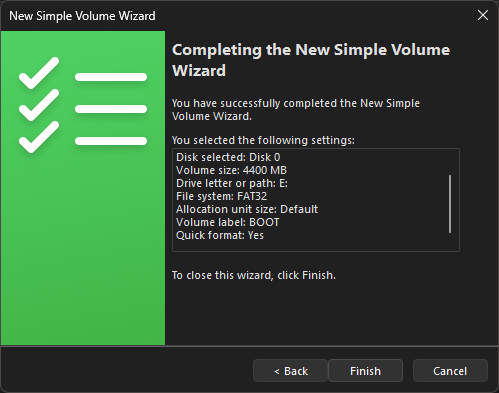
<p>Go ahead to Disk Management (<code class="language-plaintext highlighter-rouge">diskmgmt.msc</code>) and shrink any basic data partition to the size of your installation ISO (for example, if your ISO is 4.7GB, make the partition 4.7GB), in my case, since I will use Kubuntu 24.04 LTS, I will make the partition 4.4GB, just in case.</p>

<p><img src="/blog/img/2025-04-06/diskmgmtresults.png" alt="Disk Management window showing the results of the operation." /></p>

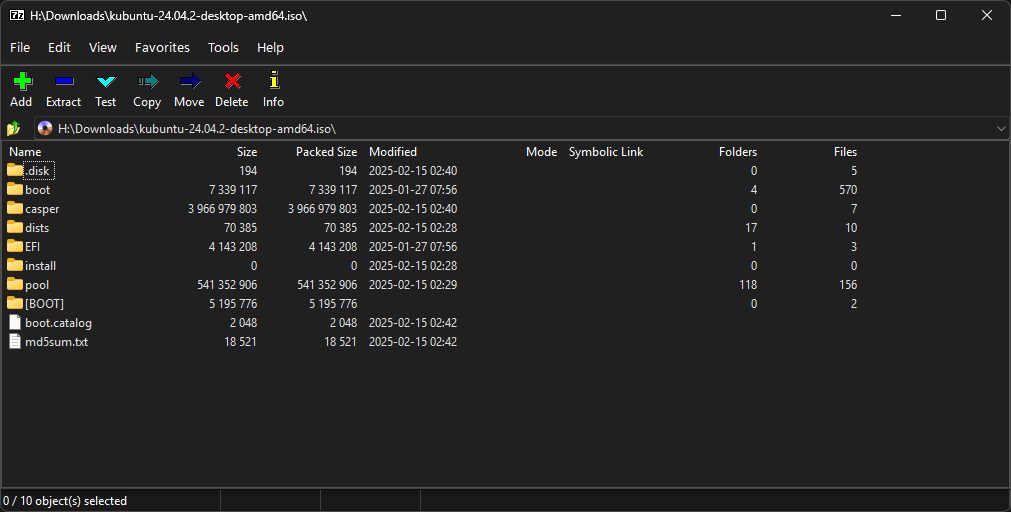
<p>You should now have a 4.4GB FAT32 partition, now get your ISO, open it via any file archiving utility like <a href="https://7zip.org">7-Zip</a> or <strong>mount it via Windows’ Image Burner</strong> (<em>if you’re on Windows 10 or 11</em>).</p>

<p><img src="/blog/img/2025-04-06/7zipfilecontents.png" alt="7-Zip File Manager showing the contents of the Kubuntu 24.04.2 LTS ISO" /></p>

<h1 id="copying-files-for-installation">Copying files for installation</h1>

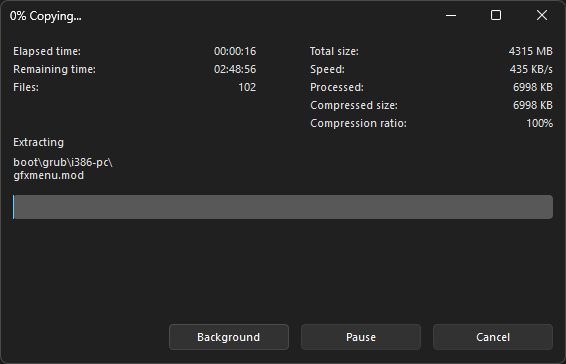
<p>With the files opened in the file explorer, copy them to the root of the FAT32 partition.</p>

<p>With 7-Zip, the dialog should look like this</p>

<p><img src="/blog/img/2025-04-06/7zipcopying.png" alt="7-Zip copying the files from the ISO to E:" /></p>

<p>….Then you’re all set! Next up reboot your computer and press F12 (or the boot menu keybind the POST screen should tell you), if done correctly, it should show the model of your hard drive, then the partition number (FYI the Windows partition is shown as Windows Boot Manager).</p>

<p>Most firmwares should directly boot from it, due to the presence of a .efi file on <code class="language-plaintext highlighter-rouge">efi\boot</code>, which will be detected as a bootable entry.</p>

<p>Now continue your installation procedure as usual, you’re all good to go!</p>

<h1 id="some-limitations">Some limitations</h1>

<p>If you want to try this on virtualizators like VMware, you’re out of luck, its boot menu doesn’t seem to show the partition, and it defaults to Windows Boot Manager (or any boot manager installed). If no OS is installed yet the partition is present, it will time out and try to boot from the network. I’m not so sure if the EFI shell will help with it, but if you manage to get it working, I’ll be sure to edit this post.</p>

<p>I’ve yet not tested on other computer with UEFI firmware, so I am not sure if it works on ALL UEFI hardware, if it doesn’t work, don’t blame me, blame your PC manufacterer.</p>

<p>Well now I’m gonna go, Horibyte signing off.</p>]]></content><author><name></name></author><category term="blog" /><summary type="html"><![CDATA[Yes, it’s actually possible, and today I’ll show you how.]]></summary><media:thumbnail xmlns:media="http://search.yahoo.com/mrss/" url="https://horibyte.is-a.dev/blog/img/2025-04-06/thumb.png" /><media:content medium="image" url="https://horibyte.is-a.dev/blog/img/2025-04-06/thumb.png" xmlns:media="http://search.yahoo.com/mrss/" /></entry><entry><title type="html">My first experience with WYSIWYG &amp;amp; Microsoft Frontpage</title><link href="https://horibyte.is-a.dev/blog/2025/03/09/my-first-experience-with-wysiwyg.html" rel="alternate" type="text/html" title="My first experience with WYSIWYG &amp;amp; Microsoft Frontpage" /><published>2025-03-09T12:00:00+00:00</published><updated>2025-03-09T12:00:00+00:00</updated><id>https://horibyte.is-a.dev/blog/2025/03/09/my-first-experience-with-wysiwyg</id><content type="html" xml:base="https://horibyte.is-a.dev/blog/2025/03/09/my-first-experience-with-wysiwyg.html"><![CDATA[<p>As you’ve might seen today, I’ve launched a new front-end of my website for old browsers, made completely with 
<strong>Microsoft FrontPage 2003</strong>, and well, today I’ll be telling the type of bugs I had to go through…</p>

<h1 id="the-begining">The begining</h1>

<p>At the start it was pretty nice, I had the “Split” view enabled since I wasn’t so sure about the whole WYSIWYG and that stuff, it was kinda nice and I did a nice test page, but then the problems arose..</p>

<h2 id="the-navegation-bar">The navegation bar</h2>

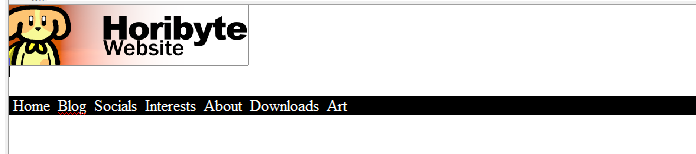
<p>If you are vieweing this on the modern website, this is how it looks like:</p>

<p><img src="/blog/img/2025-03-09/navbar.png" alt="Horibyte Website Retro Front-end navegation bar" style="width:-moz-available;height:auto;" /></p>

<p>And oh boy, it was sure painful to get everything right…</p>

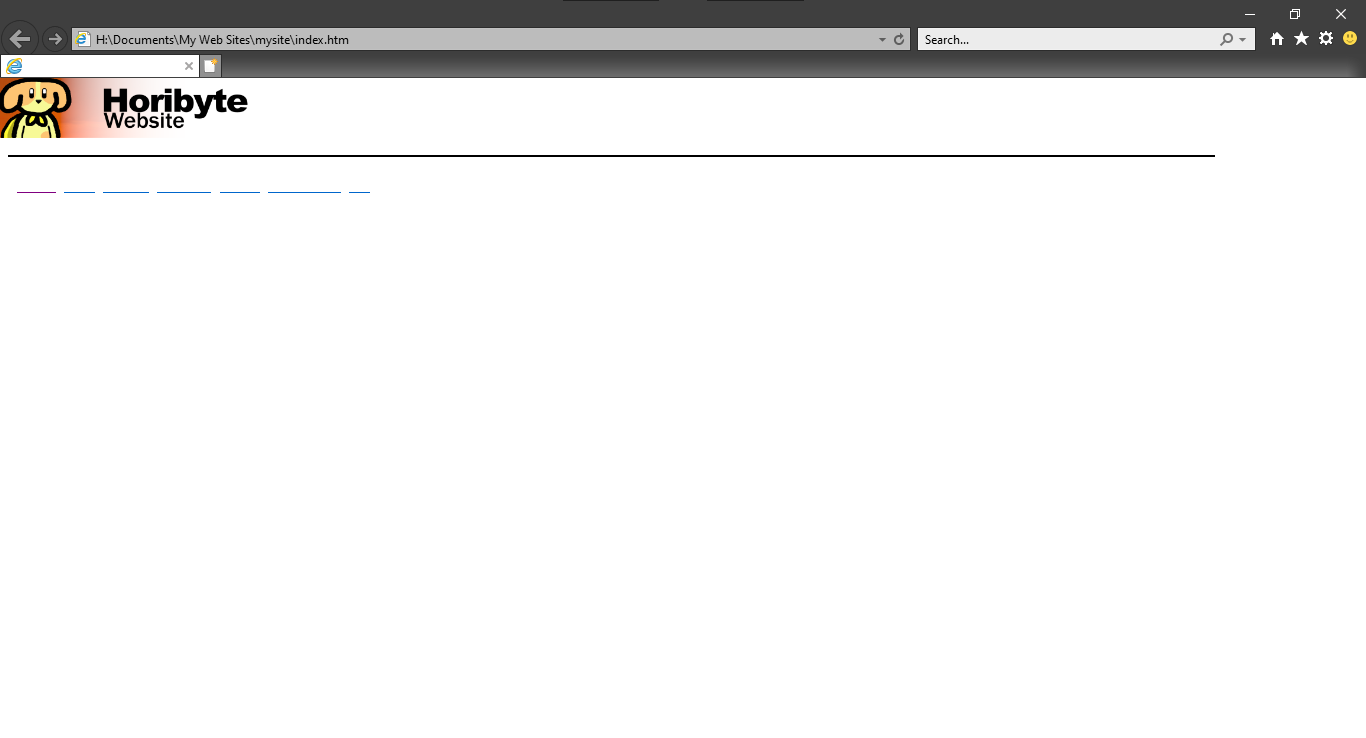
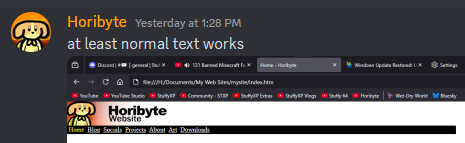
<p>Here are some screenshots of me not getting it to work cuz I have no idea how to explain it:</p>

<p><img src="/blog/img/2025-03-09/discord-thing-1.png" alt="" style="width:-moz-available;height:auto;" /></p>

<p><img src="/blog/img/2025-03-09/discord-thing-2.png" alt="" style="width:-moz-available;height:auto;" /></p>

<p><img src="/blog/img/2025-03-09/discord-thing-3.png" alt="" style="width:-moz-available;height:auto;" /></p>

<p><img src="/blog/img/2025-03-09/discord-thing-4.png" alt="" style="width:-moz-available;height:auto;" /></p>

<p>As you can see, it was trial and error to get the navbar..bar to get fully working, which took 7 hours between 2 days of fixing…yeah I could do it in like 15 mins or so but nah this took me that amount of time. Insane.</p>

<p>Not only it didn’t just want to put the text properly, I had to come up with some weird fixes for it to even go to the max of the screen like it does now.</p>

<h2 id="blog-and-centering-too">Blog, and centering, too</h2>

<p>You thought the blog didn’t have its issues, nah, it did.</p>

<p>Even tho I don’t have more screenshots of it, it was kind of pain to make the blog homepage work, here’s another example</p>

<p><img src="/blog/img/2025-03-09/discord-thing-6.png" alt="" style="width:-moz-available;height:auto;" /></p>

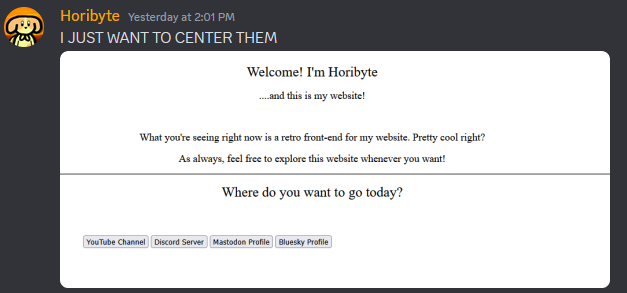
<p>Yeah things also refused to center properly, as you can see here:</p>

<p><img src="/blog/img/2025-03-09/discord-thing-5.png" alt="" style="width:-moz-available;height:auto;" /></p>

<p>Something that always annoyed me is that the Design mode is not really accurate to the preview, which made debugging it like 10x harder.</p>

<p>Lists/bullets didn’t want to work either with the fix I added which was weird..</p>

<p>When I was done with the navbar + blog, I just went to port everything else which was easy, I made the Projects and Socials page be lists cuz I’m NOT bothering to make the goddamn boxes after all I did for a single box.</p>

<h1 id="conclusion">Conclusion</h1>

<p>In the end, everything went out alright, it’s just that I suck with WYSIWYG, mainly because I’m already used to coding in general.</p>

<div class="container" style="color: lightgray; font-size: small;">
You tell me people didn't have to debug the heck out of an HTML file for it to only be a missing &lt;/div&gt;? Insane!
</div>]]></content><author><name></name></author><category term="blog" /><summary type="html"><![CDATA[As you’ve might seen today, I’ve launched a new front-end of my website for old browsers, made completely with Microsoft FrontPage 2003, and well, today I’ll be telling the type of bugs I had to go through…]]></summary><media:thumbnail xmlns:media="http://search.yahoo.com/mrss/" url="https://horibyte.is-a.dev/blog/img/2025-03-09/thumb.png" /><media:content medium="image" url="https://horibyte.is-a.dev/blog/img/2025-03-09/thumb.png" xmlns:media="http://search.yahoo.com/mrss/" /></entry><entry><title type="html">Changes were made.</title><link href="https://horibyte.is-a.dev/blog/2025/02/12/changes-were-made.html" rel="alternate" type="text/html" title="Changes were made." /><published>2025-02-12T19:00:00+00:00</published><updated>2025-02-12T19:00:00+00:00</updated><id>https://horibyte.is-a.dev/blog/2025/02/12/changes-were-made</id><content type="html" xml:base="https://horibyte.is-a.dev/blog/2025/02/12/changes-were-made.html"><![CDATA[<p>As you’ve might seen on January 1st, 2025, things about me were different already, new year, new me took seriously, innit?</p>

<p>This post will go into the reasoning why I’m now the persona known as “Horibyte”, keep reading to see more.</p>

<h1 id="before-new-years-eve">Before New Years Eve</h1>

<p>If you’ve known me for a while before 2025, you might seen me be called “Stuffy”, the name lore goes kinda deep tbh, but this post is not about that name.</p>

<p>Everything was alright just like a normal person would be in Discord…sorta lmfao</p>

<p>ANYWAY around July ‘24 I rebranded myself to StuffyXP, the branding was already out..sorta, my username was stuffyxp in other places around with Discord as well, but in July I made the StuffyXP Branding you know today, completely replacing my old branding with Dogui.</p>

<p>Around November ‘24 I was thinking of rebranding myself to something else, that month was when I looked for ideas for a new alias, what kickstarted the thought was when my friend Lynx rebranding himself to Clyron (we don’t talk about Sunn shhhhhh).</p>

<p>The ideas were brainstormed, with alot of them coming out of the blue, some guy on a Discord Server suggested “Horizon”, even though I wouldn’t use it, I did think of adding something else to the name</p>

<ul>
  <li>Horizone</li>
  <li>Horiflat</li>
  <li>Horiflake</li>
  <li>Hori<em>idklol</em>….</li>
</ul>

<p>..All of these were ideas for my new alias, the 3rd one, Horiflake, was the one who was the more appealing to me, even though it didn’t really recieve alot of positive feedback, I still wanted it, bbbbbbbut I got a comment that just….no, it’s fucking lewd and I don’t want to say what is was, first because NSFW and second, I don’t want to bring it up for that person to not get hate or smth idk.</p>

<p>After all of that, another brainstorming session came in, this time with my friend Clyron, we both brainstormed ideas for it, until the name “Horibyte” came in, we both liked it.</p>

<h2 id="what-now">What now…</h2>

<p>After the name was decided as soon as early December 2024, I began to try to come up with the branding, I actually got it first try….sorta.</p>

<p>The wordmark, banner and pfp were done in 2 hours that day, I do still have the files, here they are I guess…</p>
<div style="position: relative; margin: 0 auto; display:block;" id="bannerandpfp">
    <img src="/blog/img/2025-02-12/hb-pfp.png" alt="old horibyte pfp" width="22%" height="22%" />
    <img src="/blog/img/2025-02-12/hb-banner.png" alt="old horibyte banner" width="39.35%" height="39.35%" />
</div>

<p><img src="/blog/img/2025-02-12/hb-wordmark.png" alt="old horibyte wordmark" style="max-width: 50%; height: auto; display: block; margin-left: auto; margin-right: auto; width: 50%;" /></p>

<p>As you can see, these early versions look similar to the current branding you know today, by chance one thing I did was make one of the star’s eye blink, and the <code class="language-plaintext highlighter-rouge">01</code> on the pfp was removed too, after that, I was done.
I almost changed everything but Clyron suggested to do it on December 31st/January 1st, which I did.</p>

<p>Being Horibyte now, it honestly feels great to be someone with the name I wanted to have, the Stuffy/StuffyXP name family was kept due to legacy of my older aliases, but I thought that it was dated, and the new star on the horizon (get it?) passed and uhh idk what more lmfao</p>

<p>Either way I like the name Horibyte, planning for it to last longer than 12 months 😭🙏</p>

<h1 id="but-why">But why?</h1>

<p>Well now we are onto the reasoning why I am not Stuffy/StuffyXP anymore. Well…it’s actually a couple of reasons lmao</p>

<p>I will just do a list with MD so its easier lol</p>

<ul>
  <li>
    <p><strong>Being myself</strong>: This change was for the best in my life, as I could be whoever I wanted to be without basically just ““drowning”” my channel as I had its name for myself too, back then I was a normal he/him guy, but now I’m just a silli aroace he/they/it guy ✨</p>
  </li>
  <li>
    <p><strong>Breaking the legacy</strong>: It simply felt outdated to keep that name tradition since 2021, and it just didn’t let me who I wanted to be, this is related to the first reason, too.</p>
  </li>
  <li>
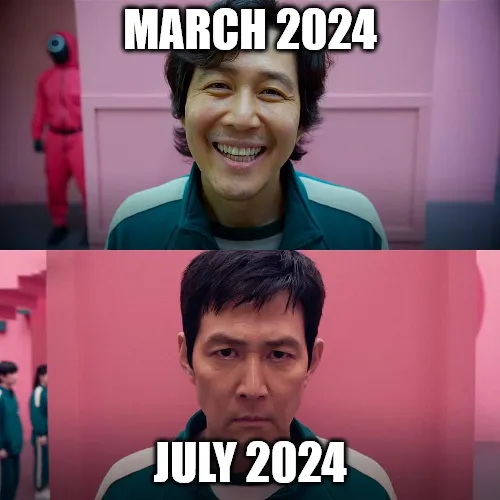
    <p><strong>Moving on from my past self</strong>: My past self was just….kinda cringe and just not very good person in general, I wasn’t mean or anything, but looking back I just don’t like it anymore, since whatever happened from March to July 2024, I changed as a whole, new me innit, this rebrand has def helped me out on moving on from all of that shit, no blog post for it though.</p>
  </li>
</ul>

<p style="text-align:center;">This image fits the thing perfectly lol</p>
<p style="font-size:2px;">&nbsp;</p>
<p><img alt="Squid Game Season 1 &amp; 2 Smile meme template, the top happy panel has the label March 2024, the more serious, mad panel has the label July 2024" src="/blog/img/2025-02-12/smile-meme.webp" style="max-width: 100; height: auto; padding-left: 28.5%;" class="is-hidden-mobile" />
<img alt="Squid Game Season 1 &amp; 2 Smile meme template, the top happy panel has the label March 2024, the more serious, mad panel has the label July 2024" src="/blog/img/2025-02-12/smile-meme.webp" style="max-width:100%!important;height:auto;" class="is-hidden-widescreen" /></p>

<ul>
  <li><strong>And for last but not least……being someone who is more likeable i guess</strong>: This one doesn’t make sense..sorta, what I mean is that with this new name and stuff, I just seem someone who is nice and stuff than the name StuffyXP (i realized what it could prob mean a while ago), i’ve met alot of new people than I ever really did on that ““name family tree”” thing I had, and honestly, I’m glad I made these changes.</li>
</ul>

<h1 id="miscellaneous">Miscellaneous</h1>

<p>These are some things that happened in the making of this blog post which I’d like to talk about.</p>

<h2 id="leaving-discord">Leaving Discord</h2>

<p>A few days ago at the start of February, I left Discord (no shit bruv), mainly simply because from December ‘24 to January ‘25 was just fucking shit to me, I just got alot of ““drama”” (it’s not really drama its just having mental breakdowns and shit lmfao).</p>

<p>Due to all of that, I just left the platform in favor of <a href="https://revolt.chat">Revolt</a>, with a server only with my very close friends so we can hang out, just so I’m not entirely alone.</p>

<p>The StuffyXP Hangout is still open, the ownership was transfered to my bestie Clyron, the server is dead without me so I don’t expect anything from it anymore.</p>

<p>I do not have a date for my comeback, but just how my life has been the shittiest it could’ve been, and with just…Discord…y’know how Discord is and you prob know what I am talking about, yeah I just dont want to make it worse.</p>

<h2 id="horicraft">Horicraft</h2>

<p>Nothing bad about this entirely, I recently (well not recently it was like 3 weeks ago whatever) a Minecraft Server, we have a lot of things and my friends and I have fun in it, the address is <code class="language-plaintext highlighter-rouge">home-appointment.gl.joinmc.link</code> is you wanna check us out, there might be some inside jokes here and there, but nothing unusual lol.</p>

<h2 id="horiwebsite-stuffyxp-website--wou">HoriWebsite, StuffyXP Website &amp; WOU</h2>

<p>These are the codenames of my websites, I only mantain one, HoriWebsite (which is the one you are on right now), and I felt like it just wasn’t necessary to just have them all there, what I did today was push one final bugfix update (ik it was like 7 more but I don’t count them if you count them I will send you to Jesus), then archived the repo, both STXP Website and WOU are in the same repo, which is at <a href="https://github.com/horibyte/stuffyxp-website">https://github.com/horibyte/stuffyxp-website</a> (ik it should’ve been <code class="language-plaintext highlighter-rouge">stuffyxp-websites</code> BUT I’M NOT BOTHERING TO CHANGE THE URLS AGAIN STICK WITH IT.).</p>

<p>The major elephant in the room with those updates were to change the URLs from <code class="language-plaintext highlighter-rouge">/css/main.css</code> to <code class="language-plaintext highlighter-rouge">/stuffyxp-website/css/main.css</code> (that is just an example.) the entire process took like 30 minutes to do at its base, I also added some new things since it could basically be considered a new build even though it was an update on the backend of it.</p>

<p>This is what I added/updated on the frontend:</p>

<ul>
  <li>New changelog added</li>
  <li>Added a link to the HoriWebsite in the Other dropdown</li>
  <li>Updated the copyright text on 2.1</li>
</ul>

<p>This was just a side project that I did for fun since today was just boring in general, the repo is archived, I also cleaned my GitHub profile, getting rid of some repos and shit, I still don’t know how do the downloads work since it’s at <code class="language-plaintext highlighter-rouge">stuffyxp.github.io</code> though.</p>

<p>You can check the website out at <a href="https://horibyte.is-a.dev/stuffyxp-website">https://horibyte.is-a.dev/stuffyxp-website</a>.</p>

<h2 id="stuffyxp-channels">StuffyXP Channel(s)</h2>

<p>The channel recently have been streaming a series of….streams in the past few days, a <strong>Windows Upgrade Saga</strong> of sorts, it took me like 3 streams to get it right, and I just started over, the reset went pretty good so far, and we managed to get to Windows 11 via the “win11 esd-win10 setup” method, which by its names implies, you use the Windows 10 setup GUI and shit, but replace 10’s install.esd with 11’s install.esd, it was fun, fun fact: that was my second WinUpgradeSaga ever, I first did one in 2019 but failed and was stuck at Windows 98 since VirtualBox, Windows 98 and a Celeron 420 don’t mix up well apparently.</p>

<p>StuffyXP’s at 221 subs at the time of writing this, thanks guys! :D</p>

<h3 id="what-about-horibyte">What about Horibyte?</h3>

<p>Around a few days ago I uploaded a YouTube Short called “when the boredom makes you do silly things ✨”, where I just BSOD’ded my laptop in sync with the Staff Roll Remake from <em>Mario &amp; Luigi: Bowser’s Inside Story + Bowser Jr.’s Journey</em>. It blew up with 500+ views, I don’t know how and why, but it did, now the Icefield Showcase from Jan 2025 is not my only video lmao.</p>

<h1 id="conclusion">Conclusion</h1>

<p>After all of what happened, I am now the persona known as Horibyte, which is one of the best decisions I ever did on my life IMO.</p>

<p>Thanks for readin’ this!!</p>

<p><em>Fun Fact 2: This blog post was made entirely in a day! It normally takes me like 3 days to make one, gotta go fast I guess lmfao.</em></p>

<!-- Ignore -->
<style>
    #bannerandpfp {
        padding-left: 27%;
    }
</style>]]></content><author><name></name></author><category term="blog" /><summary type="html"><![CDATA[As you’ve might seen on January 1st, 2025, things about me were different already, new year, new me took seriously, innit?]]></summary><media:thumbnail xmlns:media="http://search.yahoo.com/mrss/" url="https://horibyte.is-a.dev/blog/img/2025-02-12/thumb.png" /><media:content medium="image" url="https://horibyte.is-a.dev/blog/img/2025-02-12/thumb.png" xmlns:media="http://search.yahoo.com/mrss/" /></entry><entry><title type="html">StuffyXP Wrapped: 2024 Edition</title><link href="https://horibyte.is-a.dev/blog/2024/12/31/stuffyxp-wrapped-2024-edition.html" rel="alternate" type="text/html" title="StuffyXP Wrapped: 2024 Edition" /><published>2024-12-31T05:50:00+00:00</published><updated>2024-12-31T05:50:00+00:00</updated><id>https://horibyte.is-a.dev/blog/2024/12/31/stuffyxp-wrapped-2024-edition</id><content type="html" xml:base="https://horibyte.is-a.dev/blog/2024/12/31/stuffyxp-wrapped-2024-edition.html"><![CDATA[<p>Oh boy it has sure been a hell of a ride this year innit? The channel is no exception!</p>

<p>On this edition of <strong>StuffyXP Wrapped</strong>, we’ll take a look at how the channel did + other things.</p>

<h1 id="the-yt-channel">The YT Channel</h1>

<p>The channel was pretty much dead between 2022 and 2023, due to no activity at all, staying at a mere 33 subscribers.</p>

<p>Then when 2024 came around, oh boy here come the changes!</p>

<p>I originally had the channel’s topic something different than tech (i did have some videos with TheCeleryPC but that’s about it), being uhhhhhh……plushies</p>
<h6 id="i-was-a-different-person-back-then-dont-judge-me-okay">I WAS A DIFFERENT PERSON BACK THEN DON’T JUDGE ME OKAY</h6>

<p>That was also the time i joined Discord so i joined tech communities and yeah, it inspired me to make my own tech vids.</p>
<h6> </h6>
<p>The making of <a href="https://youtu.be/eKW6QilW3qo?si=KC6UaCUd2hqFZ2sF">A VMware First-Timer installs Windows XP</a>  began back in January 14th (for the record it released on February 13th), it was def pain trying to get it done, i was using the famous <em>eMachines ET1810</em> (aka The Celery PC) so yeah, Celeron, videos, they don’t mix up do they~</p>

<p>Well they do, because on February 13th the video released after using a trillion OSes and having a faulty power outlet, after that i joined a couple of subs, reacching 50 subs right after, then i stopped for a bit until i made <strong>Installing Modern Programs on Windows Vista!</strong> and <strong>The Windows XP Vibes are here! - Whistler Beta 2</strong>.</p>

<p>After a lil’ break (mostly because of school), <strong>Is the Intel Pentium F00F bug possible in 86Box?</strong> released, being one of the videos i’m most proud of. Then after that i released <strong>Haiku - The modern implementation of BeOS</strong> (and the ReactOS video before that), and oh boy the Haiku video absolutely EXPLODED.</p>

<p>1K VIEWS IN LIKE 3 DAYS. WHAT THE FU-</p>

<p>Either way, i stopped.</p>

<p>I just didn’t really have the time to make new videos, i was finishing school and uh, in short the eMachines ET1810 fucking died (i’ll talk about it later), and then ay’ up! <strong>Geometry Dash… in Windows Vista!?</strong> got released after a 1 month haitus! It will sure won’t have any issues….right? RIGHT??!?</p>

<h3 id="the-gd-in-vista-drama">The GD in Vista drama</h3>

<p>This deserves it’s own section because oh my fucking god there were some dumb drama between YT and this video oh my god~</p>

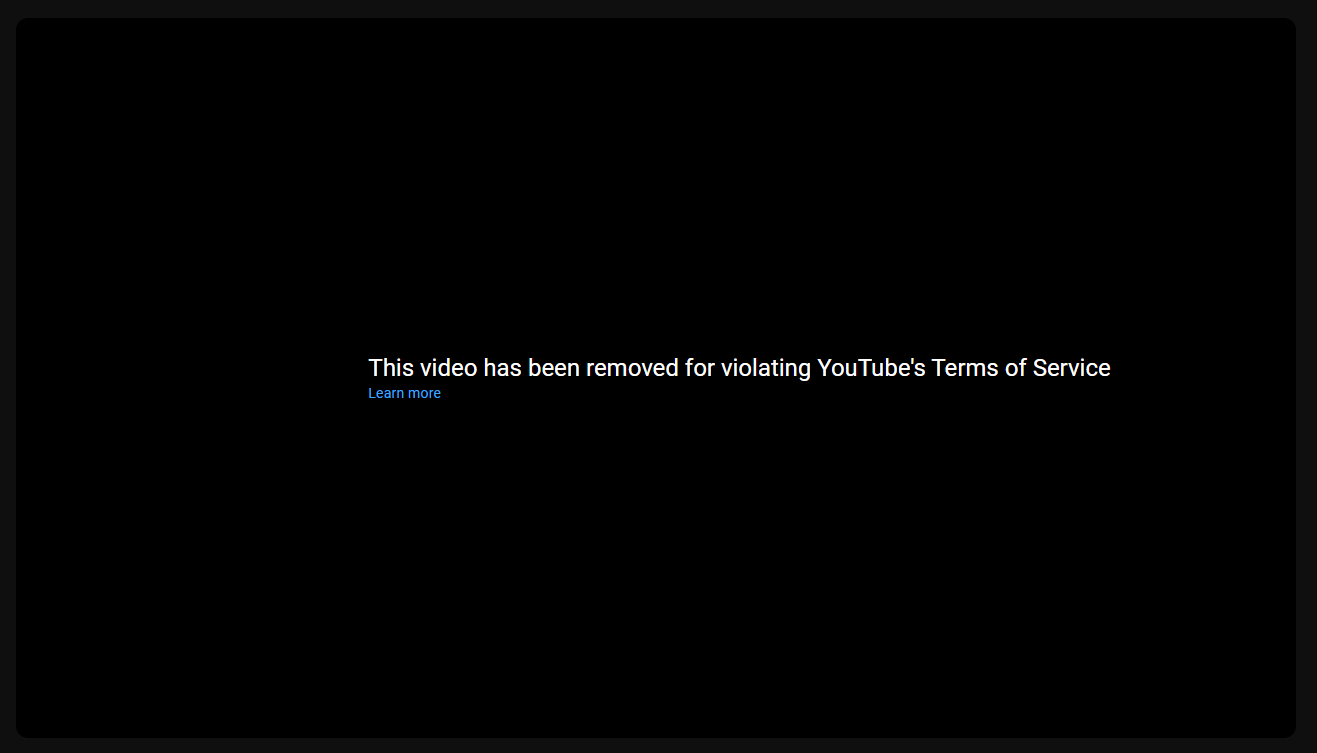
<p>Basically the first time i published it it got taken down because “it showed people how to get games illegaly”, i put a GD 2.11 link, then i re-uploaded the video without that link, it didn’t get taken down during the premiere, good</p>

<p>THEN ONE FLIPPING DAY LATER THEY TOOK IT DOWN FOR THE SAME FUCKING REASON</p>

<p><img src="/blog/img/2024-12-31/takedown.png" alt="" style="max-width: 100%; height: auto;" /></p>

<p>^ that is from like 2 weeks ago dw.</p>

<p>I woke up to my TV saying “This video has been taken down due to violating YouTube’s Terms of Service”, i turned on my lappy and sure it was, a strike, then i spent the entire day trying to figure out a convincing appeal, if it weren’t, the video would be a lost case (and media as well).</p>

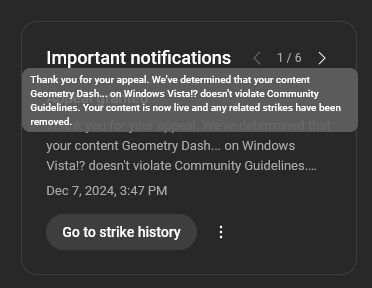
<p>But guess what, if it weren’t for the website’s homepage, this rare YT W is brought to you by a real person, baby!
How did i notice? Well uh its thanks to my TV again lmfao</p>

<p>I searched myself up for no reason and there it was, Geometry Dash on Windows Vista on the channel’s page, truly a legendary Pokemon to have, fuck Mew, fuck Ditto, THIS is a real legendary Pokemon.</p>

<p><img src="/blog/img/2024-12-31/rareytw.png" alt="" style="max-width: 100%; height: auto;" /></p>

<p>I still have a Warning but that will go away soon so i dont mind it.</p>

<p>As a lil’ christmas gift from yours truly, <strong>Using Windows 11 for the first time!</strong> released too for your viewing pleasure :3c</p>

<p>Either way it truly was an amazing year for the channel, the best for far one would say, over 100 subscribers (182 actually), and 10K total views, i would’ve never imagined that, thank you! :D</p>

<p>Oh i also gotta mention Stuffy 64 as well, that boi has 175 subs, amazing!</p>

<h3 id="the-celery-pc-status">The Celery PC Status</h3>

<p>Basically after an unexpected power cut, the computer suddenly powered on without me ever powering on the thing itself (it powered on on its own)</p>

<p>After some investigating with my dad, we eventually figured out that when the power came back, it overloaded the thing that gives DC making it no longer give DC, making some components unable to power on, things that needed AC like the fans worked just fine, after a month (aka when i came out of the haitus), my dad got me a new PC :D</p>

<p>So yeah R.I.P 2010 - 2024 eMachines ET1810-03 - <em>Your Celery moments were the best.</em></p>

<h1 id="the-website">The Website</h1>

<p>Well i gotta talk about the exact website you are on right now, stuffyxp.github.io innit?</p>

<p>Well it has truly been fun and unfun to code from scratch, from it’s quirks on iPads to me using the iPhone Sea (SE) to test the mobile side.</p>

<p>It has been around for a looooong while actually, since April 2024, it had alot of different versions, <a href="https://youtu.be/lT-vNY7-1lI?si=0XMUC8N01QyK5cUL">you can find the earliest one here</a>.
The one you are viewing right one is <strong>Version 2.1.1</strong>, but there is also version 1.0 (fun fact: v1.1 introduced codenames!)</p>

<p>It went from alot of styles, fun fact, the sequel!: the type of navbar is actually inspired from v0.1’s navbar.
Version 1.0 introduced tabs, similar to Lynxmic’s website at the time.</p>

<p>I have nothing more else to say here lmao.</p>

<h1 id="discord">Discord</h1>

<p>Not only has it been an amazing year to the YouTube channel, but to me in Discord as well, i met new people and made friends for the first time! (shocking)</p>

<p>I made two total Discord servers for the channel (<a href="https://discord.gg/5n8sDTR37v">invite</a>), joined many new communities and currently have the best friends and community i could ask for &lt;3</p>

<p>You can also have a chat with me over there! :D (it might take me some time tho as i have social anxiety xD)
Either way thanks for one amazing year on Discord too, hope to see more!</p>

<h1 id="fedi">Fedi</h1>

<p>(FYI Fedi is the network where clients like Mastodon connect to, they’re basically the same thing)
Of course i can’t not mention the social platform of all time, it’s gonna be my 1 year anniversary in 2 months :O</p>

<p>It has been one of my primary social media to stay on and i can’t thank anyone else enough for supporting me there for these months :D</p>

<p>I met new people too over there, such a lovely place!
(oh i forgot abt bluesky i recently joined that xD)</p>

<p>And well that’s it for today folks! Thanks for sticking around with for these months, if you’re still in 2024, enjoy the last hours of it, and if you’re in 2025, heya :3</p>

<p><em>Oh also if you got ALL the references in the thumbnail, you’re a fucking legend.</em></p>

<p>Catch the stuff, and pass it on, StuffyXP out.</p>]]></content><author><name></name></author><category term="blog" /><summary type="html"><![CDATA[Oh boy it has sure been a hell of a ride this year innit? The channel is no exception! On this edition of StuffyXP Wrapped, we’ll take a look at how the channel did + other things. The YT Channel The channel was pretty much dead between 2022 and 2023, due to no activity at all, staying at a mere 33 subscribers. Then when 2024 came around, oh boy here come the changes! I originally had the channel’s topic something different than tech (i did have some videos with TheCeleryPC but that’s about it), being uhhhhhh……plushies I WAS A DIFFERENT PERSON BACK THEN DON’T JUDGE ME OKAY That was also the time i joined Discord so i joined tech communities and yeah, it inspired me to make my own tech vids.   The making of A VMware First-Timer installs Windows XP began back in January 14th (for the record it released on February 13th), it was def pain trying to get it done, i was using the famous eMachines ET1810 (aka The Celery PC) so yeah, Celeron, videos, they don’t mix up do they~ Well they do, because on February 13th the video released after using a trillion OSes and having a faulty power outlet, after that i joined a couple of subs, reacching 50 subs right after, then i stopped for a bit until i made Installing Modern Programs on Windows Vista! and The Windows XP Vibes are here! - Whistler Beta 2. After a lil’ break (mostly because of school), Is the Intel Pentium F00F bug possible in 86Box? released, being one of the videos i’m most proud of. Then after that i released Haiku - The modern implementation of BeOS (and the ReactOS video before that), and oh boy the Haiku video absolutely EXPLODED. 1K VIEWS IN LIKE 3 DAYS. WHAT THE FU- Either way, i stopped. I just didn’t really have the time to make new videos, i was finishing school and uh, in short the eMachines ET1810 fucking died (i’ll talk about it later), and then ay’ up! Geometry Dash… in Windows Vista!? got released after a 1 month haitus! It will sure won’t have any issues….right? RIGHT??!? The GD in Vista drama This deserves it’s own section because oh my fucking god there were some dumb drama between YT and this video oh my god~ Basically the first time i published it it got taken down because “it showed people how to get games illegaly”, i put a GD 2.11 link, then i re-uploaded the video without that link, it didn’t get taken down during the premiere, good THEN ONE FLIPPING DAY LATER THEY TOOK IT DOWN FOR THE SAME FUCKING REASON ^ that is from like 2 weeks ago dw. I woke up to my TV saying “This video has been taken down due to violating YouTube’s Terms of Service”, i turned on my lappy and sure it was, a strike, then i spent the entire day trying to figure out a convincing appeal, if it weren’t, the video would be a lost case (and media as well). But guess what, if it weren’t for the website’s homepage, this rare YT W is brought to you by a real person, baby! How did i notice? Well uh its thanks to my TV again lmfao I searched myself up for no reason and there it was, Geometry Dash on Windows Vista on the channel’s page, truly a legendary Pokemon to have, fuck Mew, fuck Ditto, THIS is a real legendary Pokemon. I still have a Warning but that will go away soon so i dont mind it. As a lil’ christmas gift from yours truly, Using Windows 11 for the first time! released too for your viewing pleasure :3c Either way it truly was an amazing year for the channel, the best for far one would say, over 100 subscribers (182 actually), and 10K total views, i would’ve never imagined that, thank you! :D Oh i also gotta mention Stuffy 64 as well, that boi has 175 subs, amazing! The Celery PC Status Basically after an unexpected power cut, the computer suddenly powered on without me ever powering on the thing itself (it powered on on its own) After some investigating with my dad, we eventually figured out that when the power came back, it overloaded the thing that gives DC making it no longer give DC, making some components unable to power on, things that needed AC like the fans worked just fine, after a month (aka when i came out of the haitus), my dad got me a new PC :D So yeah R.I.P 2010 - 2024 eMachines ET1810-03 - Your Celery moments were the best. The Website Well i gotta talk about the exact website you are on right now, stuffyxp.github.io innit? Well it has truly been fun and unfun to code from scratch, from it’s quirks on iPads to me using the iPhone Sea (SE) to test the mobile side. It has been around for a looooong while actually, since April 2024, it had alot of different versions, you can find the earliest one here. The one you are viewing right one is Version 2.1.1, but there is also version 1.0 (fun fact: v1.1 introduced codenames!) It went from alot of styles, fun fact, the sequel!: the type of navbar is actually inspired from v0.1’s navbar. Version 1.0 introduced tabs, similar to Lynxmic’s website at the time. I have nothing more else to say here lmao. Discord Not only has it been an amazing year to the YouTube channel, but to me in Discord as well, i met new people and made friends for the first time! (shocking) I made two total Discord servers for the channel (invite), joined many new communities and currently have the best friends and community i could ask for &lt;3 You can also have a chat with me over there! :D (it might take me some time tho as i have social anxiety xD) Either way thanks for one amazing year on Discord too, hope to see more! Fedi (FYI Fedi is the network where clients like Mastodon connect to, they’re basically the same thing) Of course i can’t not mention the social platform of all time, it’s gonna be my 1 year anniversary in 2 months :O It has been one of my primary social media to stay on and i can’t thank anyone else enough for supporting me there for these months :D I met new people too over there, such a lovely place! (oh i forgot abt bluesky i recently joined that xD) And well that’s it for today folks! Thanks for sticking around with for these months, if you’re still in 2024, enjoy the last hours of it, and if you’re in 2025, heya :3 Oh also if you got ALL the references in the thumbnail, you’re a fucking legend. Catch the stuff, and pass it on, StuffyXP out.]]></summary><media:thumbnail xmlns:media="http://search.yahoo.com/mrss/" url="https://horibyte.is-a.dev/blog/img/2024-12-31/stxpwrapped24.png" /><media:content medium="image" url="https://horibyte.is-a.dev/blog/img/2024-12-31/stxpwrapped24.png" xmlns:media="http://search.yahoo.com/mrss/" /></entry><entry><title type="html">How Globed can save your Geometry Dash account</title><link href="https://horibyte.is-a.dev/blog/2024/12/15/how-globed-can-save-your-gd-account.html" rel="alternate" type="text/html" title="How Globed can save your Geometry Dash account" /><published>2024-12-15T12:03:21+00:00</published><updated>2024-12-15T12:03:21+00:00</updated><id>https://horibyte.is-a.dev/blog/2024/12/15/how-globed-can-save-your-gd-account</id><content type="html" xml:base="https://horibyte.is-a.dev/blog/2024/12/15/how-globed-can-save-your-gd-account.html"><![CDATA[<p>Ay’ up! So this might seem weird but this silly mod can actually save your GD account from being compromised.
How you may ask? Keep reading to found out!</p>

<h1 id="prologue">Prologue</h1>

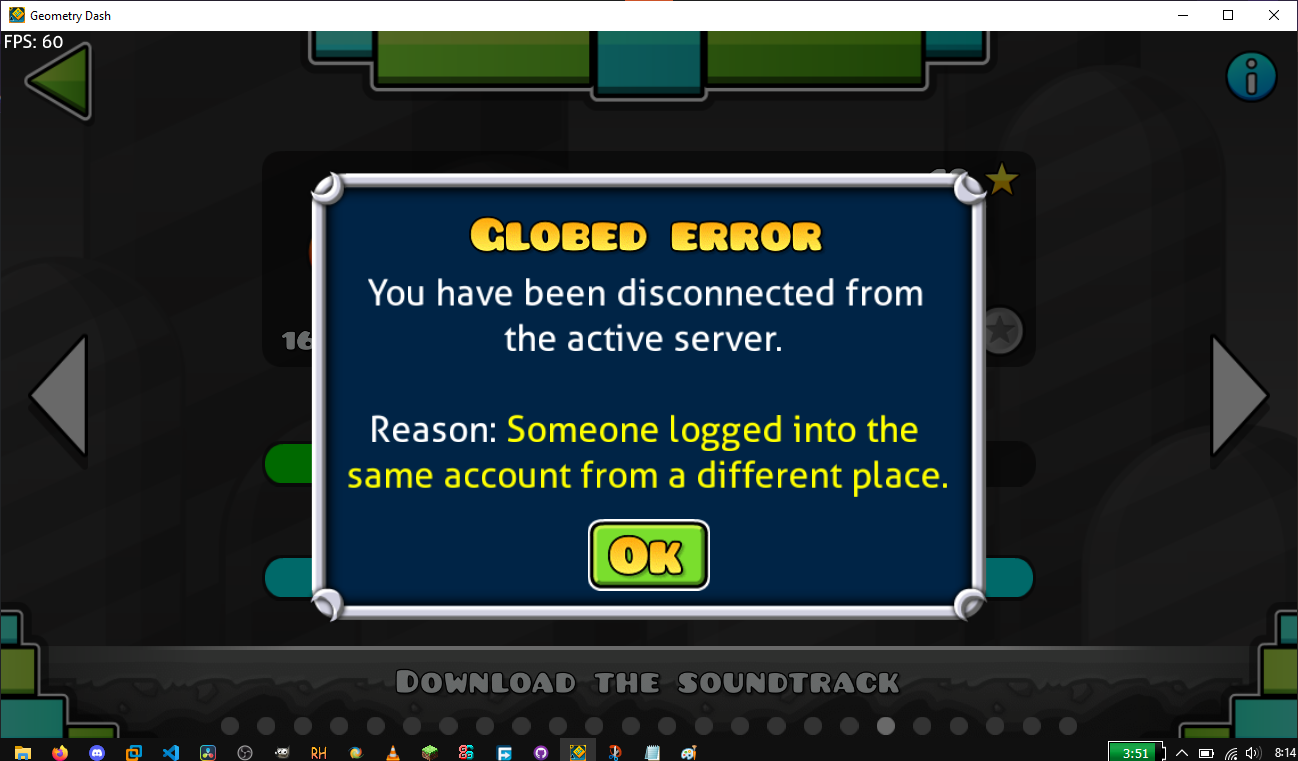
<p>A few days ago i was playing Geometry Dash with other people via Globed, it’s basically 2.2’s delayed Versus mode made before RubRub even added it, then after going AFK for dinner, i came across the following message when coming back to my lappy…</p>

<p><img src="/blog/img/2024-12-15/globed-error.png" alt="" style="max-width: 100; height: auto;" />
Logged into my account in a different place?? What does that mean?</p>
<h1 id="the-hacking">The Hacking</h1>

<p>If you’ve been on the <strong>Minecraft</strong> community for a while, this may seem familiar to you.
<em>I was hacked.</em></p>

<p>Now, I was freaking out, i tried going into the <a href="https://www.boomlings.com/database/accounts/accountManagement.php">Account Management page</a> to try to change my password to no avail.</p>

<h2 id="how-did-i-notice">How did i notice?</h2>

<p>Well i’ll try to explain as best as i can.</p>

<p>When you use Globed for the first time, it will ask you if you agree for a bot to send you a message then delete it for aunthentication. If everything goes right, you’re in!</p>

<p>This method only happens locally, meaning that you will have to do it every single time you install Globed on a GD client, this does not transfer with Steam either.</p>

<p>Now, what happens when you aunthenticate on a new client while a client that already has an open session? (you may know the answer by now…)
It logs you out and let the new client in! Now it also gives you the prior warning that i showed you.</p>

<p>This is kinda similar to another incident in the Minecraft community, it just gives the same error as seen above.</p>

<h1 id="how-is-this-useful">How is this useful?</h1>

<p>By giving that warning, it advices you that someone else (a hacker) logged into your account, shoutout to the Globed team for adding this.</p>

<p>I emailed RobTop (<a href="mailto:support@robtopgames.com">via the support email</a>) about my compromised account not to found out a day later that i could reset my password via the previously mentioned account management page.
Which using that reset password method i should’ve changed my password for my main email as well-</p>

<p>Either way this is the end of this blog post, cya! ^^</p>]]></content><author><name></name></author><category term="blog" /><summary type="html"><![CDATA[Ay’ up! So this might seem weird but this silly mod can actually save your GD account from being compromised. How you may ask? Keep reading to found out! Prologue A few days ago i was playing Geometry Dash with other people via Globed, it’s basically 2.2’s delayed Versus mode made before RubRub even added it, then after going AFK for dinner, i came across the following message when coming back to my lappy… Logged into my account in a different place?? What does that mean? The Hacking If you’ve been on the Minecraft community for a while, this may seem familiar to you. I was hacked. Now, I was freaking out, i tried going into the Account Management page to try to change my password to no avail. How did i notice? Well i’ll try to explain as best as i can. When you use Globed for the first time, it will ask you if you agree for a bot to send you a message then delete it for aunthentication. If everything goes right, you’re in! This method only happens locally, meaning that you will have to do it every single time you install Globed on a GD client, this does not transfer with Steam either. Now, what happens when you aunthenticate on a new client while a client that already has an open session? (you may know the answer by now…) It logs you out and let the new client in! Now it also gives you the prior warning that i showed you. This is kinda similar to another incident in the Minecraft community, it just gives the same error as seen above. How is this useful? By giving that warning, it advices you that someone else (a hacker) logged into your account, shoutout to the Globed team for adding this. I emailed RobTop (via the support email) about my compromised account not to found out a day later that i could reset my password via the previously mentioned account management page. Which using that reset password method i should’ve changed my password for my main email as well- Either way this is the end of this blog post, cya! ^^]]></summary><media:thumbnail xmlns:media="http://search.yahoo.com/mrss/" url="https://horibyte.is-a.dev/blog/img/2024-12-15/thumb.png" /><media:content medium="image" url="https://horibyte.is-a.dev/blog/img/2024-12-15/thumb.png" xmlns:media="http://search.yahoo.com/mrss/" /></entry><entry><title type="html">How to get Camtasia Recorder 8 working on Windows Vista</title><link href="https://horibyte.is-a.dev/blog/2024/09/28/how-to-get-camrec8-working-on-win-vista.html" rel="alternate" type="text/html" title="How to get Camtasia Recorder 8 working on Windows Vista" /><published>2024-09-28T00:00:00+00:00</published><updated>2024-09-28T00:00:00+00:00</updated><id>https://horibyte.is-a.dev/blog/2024/09/28/how-to-get-camrec8-working-on-win-vista</id><content type="html" xml:base="https://horibyte.is-a.dev/blog/2024/09/28/how-to-get-camrec8-working-on-win-vista.html"><![CDATA[<p>(<em>this is just a filler post as <a href="https://youtube.com/AzWtlbS2qJM">i uploaded a video today</a>, so why not give you guys some more stuffy content? :)</em>)</p>
<p>Ok so you’ve decided to get into video editng and YouTube video making and all that stuff with your good ol’ Windows Vista machine, great!!
<img src="/blog/img/2024-09-28/camrec8%201.JPG" alt="" style="max-width: 100; height: auto;" /></p>

<p>You chose Camtasia Studio as your video editor, which has A BUILT-IN RECORDER FOR YOUR SCREEN?!?!?!?
(ok it’s not that deep but okay)</p>

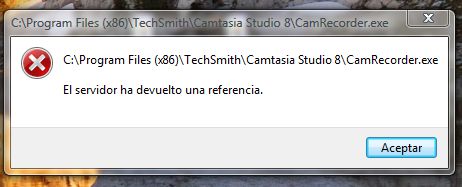
<p>And when you’re about to film your “”"”tutorial””””, you get greeted by this error…</p>

<p><img src="/blog/img/2024-09-28/camrec8%202.JPG" alt="" style="max-width: 100%; height: auto;" /></p>

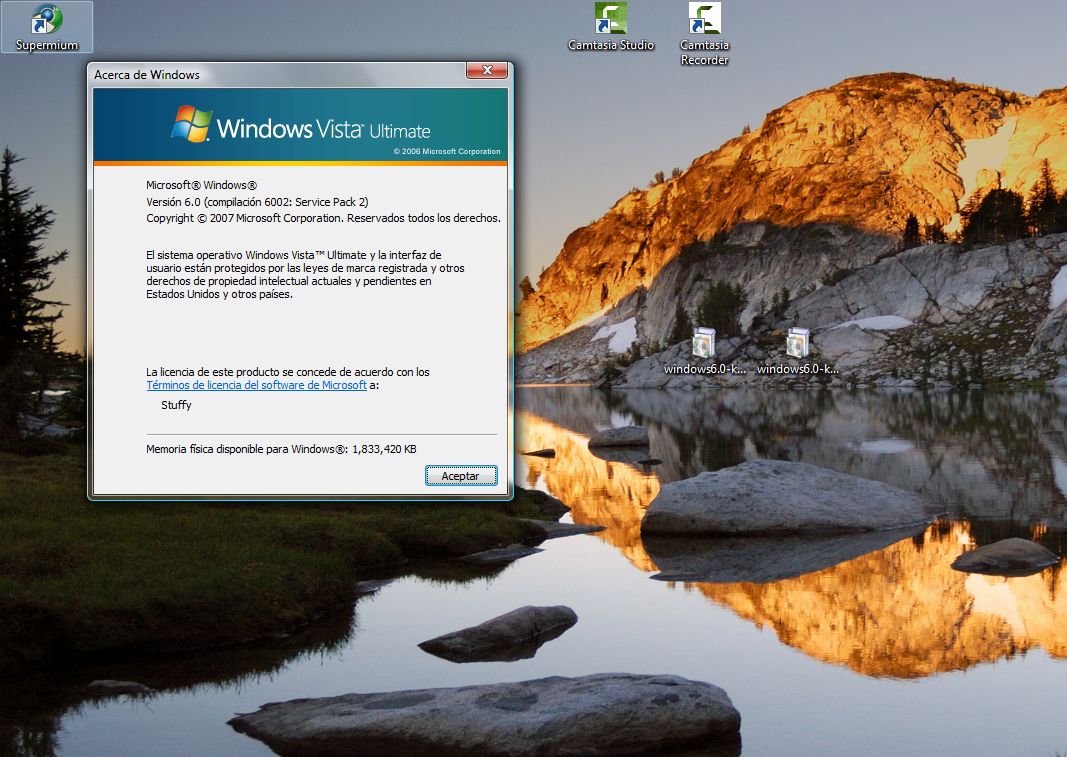
<p>Well today i’m gonna walkthrough you on how to fix this annoying error (side note: this only happens on Windows Vista no matter what Service Pack you’re in, and it <em>only</em> happen on Vista, XP, 7 and up do not have this problem…)</p>

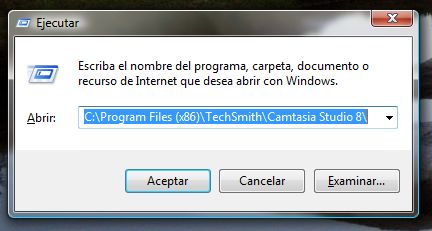
<p>On the desktop, press on your keyboard the keys (oh wow the irony lmao) Win + R, this should open up</p>

<p><img src="/blog/img/2024-09-28/camrec8%203.JPG" alt="" style="max-width: 100%; height: auto;" /></p>

<p>As you can see i already have that path written, but be sure to write that in in the run box: <code class="language-plaintext highlighter-rouge">C:\Program Files (x86)\TechSmith\Camtasia Studio 8</code></p>

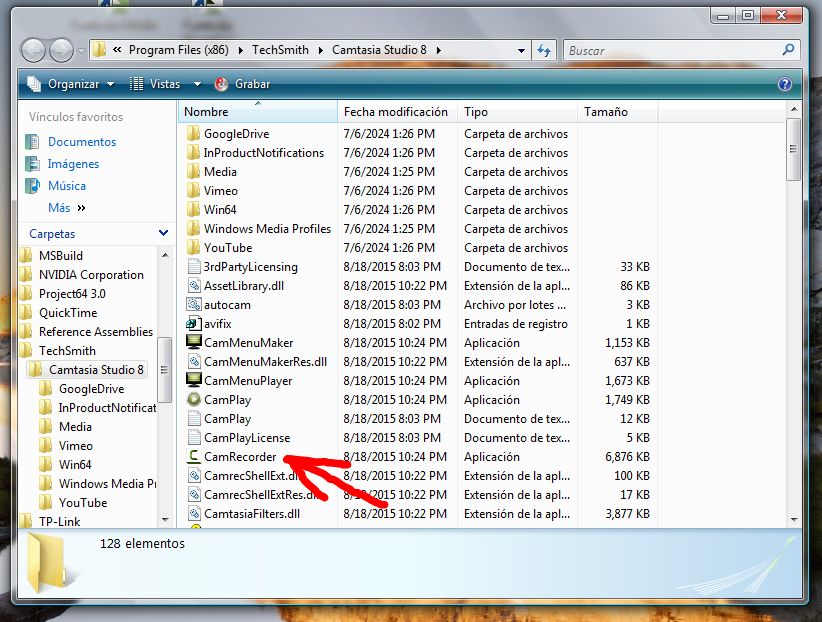
<p>After that, select the following program, double-click it and click “Properties”</p>

<p><img src="/blog/img/2024-09-28/camrec8%204.JPG" alt="" style="max-width: 100%; height: auto;" /></p>

<p><em>image showing CamRecorder.exe being selected in Windows Explorer (sorry for the badly drawn arrow lmaooo)</em></p>

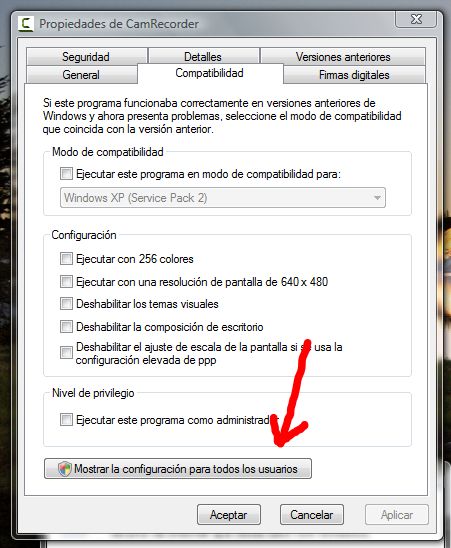
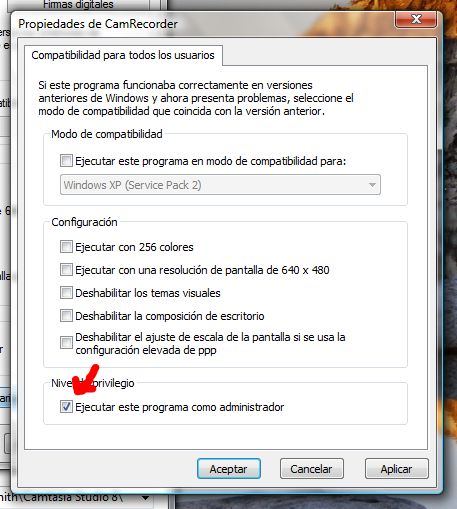
<p>After that, chose the “Compatibility” tab on the window and click “Show settings for all users” or smething similar (<em>sorry that it’s in Spanish i use(d to use) Spanish Windows…</em>)</p>

<p><img src="/blog/img/2024-09-28/camrec8%205.JPG" alt="" style="max-width: 100%; height: auto;" /></p>

<p>Another window should open up, just tick the “Run this program as an administrator” checkbox, then click OK until you’re back to the Windows Explorer window</p>

<p><img src="/blog/img/2024-09-28/camrec8%206.JPG" alt="" style="max-width: 100%; height: auto;" /></p>

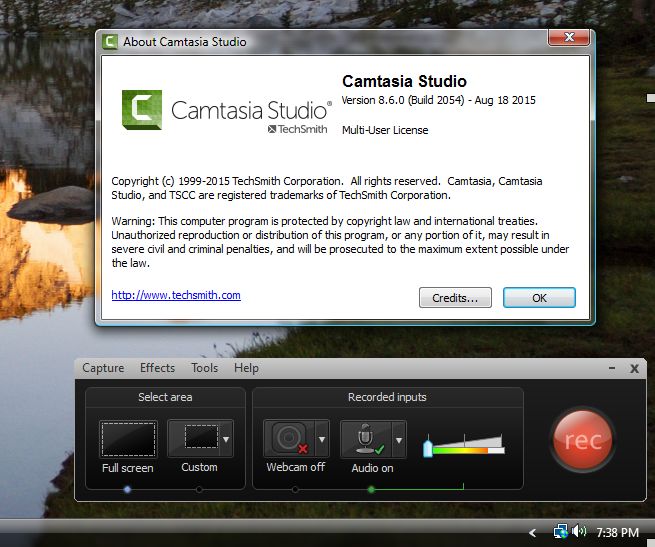
<p>Then launch Camtasia Recorder as usual, and it should open up just fine, congratulations! you just fixed that one server referall error! :D</p>

<p><img src="/blog/img/2024-09-28/camrec8%207.JPG" alt="" style="max-width: 100%; height: auto;" /></p>

<p>Now just continue your recording and video editing as usual!</p>

<p><em>Note: Applying the compatibility settings under Windows XP SP2 may also work, but it’ll lack audio support when recording, so this is better if you are recording something audio focused or anything else related to audio.</em></p>]]></content><author><name></name></author><category term="blog" /><summary type="html"><![CDATA[(this is just a filler post as i uploaded a video today, so why not give you guys some more stuffy content? :)) Ok so you’ve decided to get into video editng and YouTube video making and all that stuff with your good ol’ Windows Vista machine, great!! You chose Camtasia Studio as your video editor, which has A BUILT-IN RECORDER FOR YOUR SCREEN?!?!?!? (ok it’s not that deep but okay) And when you’re about to film your “”"”tutorial””””, you get greeted by this error… Well today i’m gonna walkthrough you on how to fix this annoying error (side note: this only happens on Windows Vista no matter what Service Pack you’re in, and it only happen on Vista, XP, 7 and up do not have this problem…) On the desktop, press on your keyboard the keys (oh wow the irony lmao) Win + R, this should open up As you can see i already have that path written, but be sure to write that in in the run box: C:\Program Files (x86)\TechSmith\Camtasia Studio 8 After that, select the following program, double-click it and click “Properties” image showing CamRecorder.exe being selected in Windows Explorer (sorry for the badly drawn arrow lmaooo) After that, chose the “Compatibility” tab on the window and click “Show settings for all users” or smething similar (sorry that it’s in Spanish i use(d to use) Spanish Windows…) Another window should open up, just tick the “Run this program as an administrator” checkbox, then click OK until you’re back to the Windows Explorer window Then launch Camtasia Recorder as usual, and it should open up just fine, congratulations! you just fixed that one server referall error! :D Now just continue your recording and video editing as usual! Note: Applying the compatibility settings under Windows XP SP2 may also work, but it’ll lack audio support when recording, so this is better if you are recording something audio focused or anything else related to audio.]]></summary><media:thumbnail xmlns:media="http://search.yahoo.com/mrss/" url="https://horibyte.is-a.dev/blog/img/2024-09-28/thumb.png" /><media:content medium="image" url="https://horibyte.is-a.dev/blog/img/2024-09-28/thumb.png" xmlns:media="http://search.yahoo.com/mrss/" /></entry><entry><title type="html">The Ubuntu Server experience.</title><link href="https://horibyte.is-a.dev/blog/2024/09/16/the-ubuntu-server-experience.html" rel="alternate" type="text/html" title="The Ubuntu Server experience." /><published>2024-09-16T00:00:00+00:00</published><updated>2024-09-16T00:00:00+00:00</updated><id>https://horibyte.is-a.dev/blog/2024/09/16/the-ubuntu-server-experience</id><content type="html" xml:base="https://horibyte.is-a.dev/blog/2024/09/16/the-ubuntu-server-experience.html"><![CDATA[<p>Well i have gotten again into what is the Linux world, and oh well it was kind of a hassle, today i’ll be telling you my experience with the GNOME-less/GUI-less Ubuntu, known as Ubuntu Server.</p>

<h2 id="the-prologue">The Prologue</h2>

<p>You may ask why did i even did this, well basically after running out of space on my Xubuntu install (for the 2nd time), i decided to try something different, as uh, the Xubuntu Minimal install is particularly broken, i couldn’t even manage my own account!</p>

<p>My Linux distro of choice is Ubuntu Server, 22.04 Jammy Jellyfish (i can’t run 24.04 my system is not compatible okay), as Canonical said on their downloads website, and i quote: “It will not install a graphical user interface.”, interesting, huh, i thought to myself, as we’re Debian all of a sudden again! - jokes aside i was kinda curious about this, as i won’t have to deal with GNOME anymore, and just install my favorite Linux DE: XFCE!</p>

<p>I used Unetbootin to add the Linux image to the Windows Boot Manager, booted it up and worked like a charm, i even managed to not clean my disk by accident since GParted was not present! :D</p>

<p>All of that aside, something went wrong, no it didn’t error out when installing, it just didn’t recognize my network “”””"”card””””””, basically it was a network USB, a “Belkin Wireless G USB Network Adapter F5D7050” to be exact, it did detect my Ethernet cards (yes, <em>cards</em>, idk why does the eMachines ET1810 have two Ethernet cards), i didn’t really think about it and just did the installation as usual, and no, this does not look like the Debian installer , it looks more nice and friendly in my opinion, anyways everything went well and i was network-less, and oh boy i wouldn’t know how of much a problem that would be…</p>

<h2 id="the-problems">The problems</h2>

<p>Everybody encounters issues when trying new things, i’m no exception! (as always haha).</p>

<p>As said earlier, networking was one of those problems, i tried everything to make it work, searched up a tutorial on YT, and it actually worked, i was just kind of an idiot when doing so, it worked like a charm tho, if not this website wouldn’t exist, anyway here’s some highlights of the shenanigans i went through.</p>

<h3 id="ubuntu-cli-and-wi-fi">Ubuntu CLI and Wi-Fi</h3>

<p>First of all, i installed some packages from <a href="https://packages.ubuntu.com">the official Ubuntu packages website</a>, and unlike Microsoft, they actually had packages for older, unsupported releases! I went ahead and downloaded the WPA supplicant and some other dependencies, installed it and… no change, then i saw that you need to edit some .yml file located in “<code class="language-plaintext highlighter-rouge">/etc/defualt/netplan</code>”, i opened it with GNU nano, and just added my device, configured it, added the SSID and password and used DHCP4, and it didn’t work… :/</p>

<p>It turned out that i edited the wrong file, i did it all again, and when i restarted it didn’t save for some reason, did it again and again for like 5 minutes, then in like the 16th time, i saw the verbose startup and …boom.. I saw “<code class="language-plaintext highlighter-rouge">197.168.0.24</code>” as the IP address and finally, i had been connected, i don’t know what i did but Ubuntu finally decided to accept the settings! i pinged www.google.com (as every PC user would do, i think) and i recieved 64 bytes as a reply!</p>

<p>With networking out of the way, i had another problem…</p>

<h3 id="the-xfcexorgx11-shenanigans">The XFCE/Xorg/X11 shenanigans</h3>

<p>The network configuration was done. Perfect. Now what?</p>

<p>Well i certainly not gonna use a command-line-interface for Linux the entire time so i went ahead and with my newly configured network, to install an X11 server!
I used <code class="language-plaintext highlighter-rouge">apt install (some command here i don't remember what installed x11 lmao)</code> to get up and running X11, execpt it didnt really work… then i decided to get <code class="language-plaintext highlighter-rouge">xubuntu-desktop</code> and it didnt work either, it opened but crashed on startup.</p>

<p>I saw a tutorial on how to get XFCE 4.16, ran the ansible-playbook (since it required it), but before that i got some files from that person’s website (the tutorial said so so don’t worry), i opened but required my SSH password… yeah i didn’t know how to get that…</p>

<p>I tried with my own user’s password, it didn’t work, i tried the root passowrd, it didn’t work either, at this point i didn’t know what else i could try so i just gave up, and no i didn’t delete the partition dw.</p>

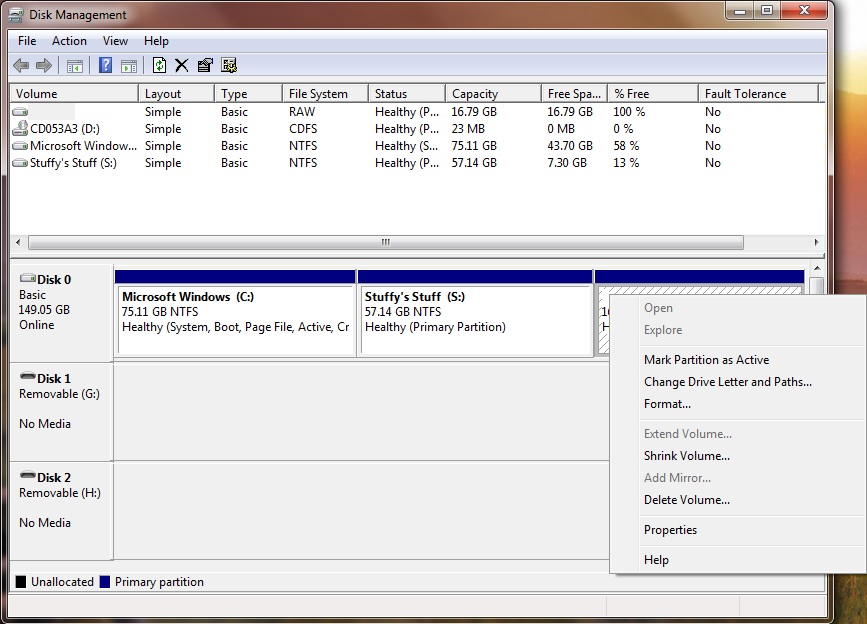
<p>Then, after a restart (since i wanted to do show something funny on Windows, the pic below is what i wanted to show), then i rebooted back into Ubuntu and… i got what i wanted… almost.</p>

<p><img src="/blog/img/2024-09-16/winpic.jpg" alt="" style="max-width: 100%; height: auto;" />
<em>Windows 7 Disk Management window letting me assign a letter, shrink and mount the Linux volume, which does not happen with other distros I had around (this did not happen with Xubuntu), prob happened since I first used that volume as FAT32 then used it in the installer so I wouldn’t get confused lmao</em></p>
<p>For some reason it installed GNOME instead of XFCE, i had a GUI, yay i guess, then everything went straightfoward, i opened the terminal, ran <code class="language-plaintext highlighter-rouge">sudo apt install xfce4</code> and done, XFCE was installed, i just needed to make it the defualt session.</p>

<p>It took me a while on how to login into XFCE but then i just did and done! XFCE 4.16 was installed and worked like a charm!
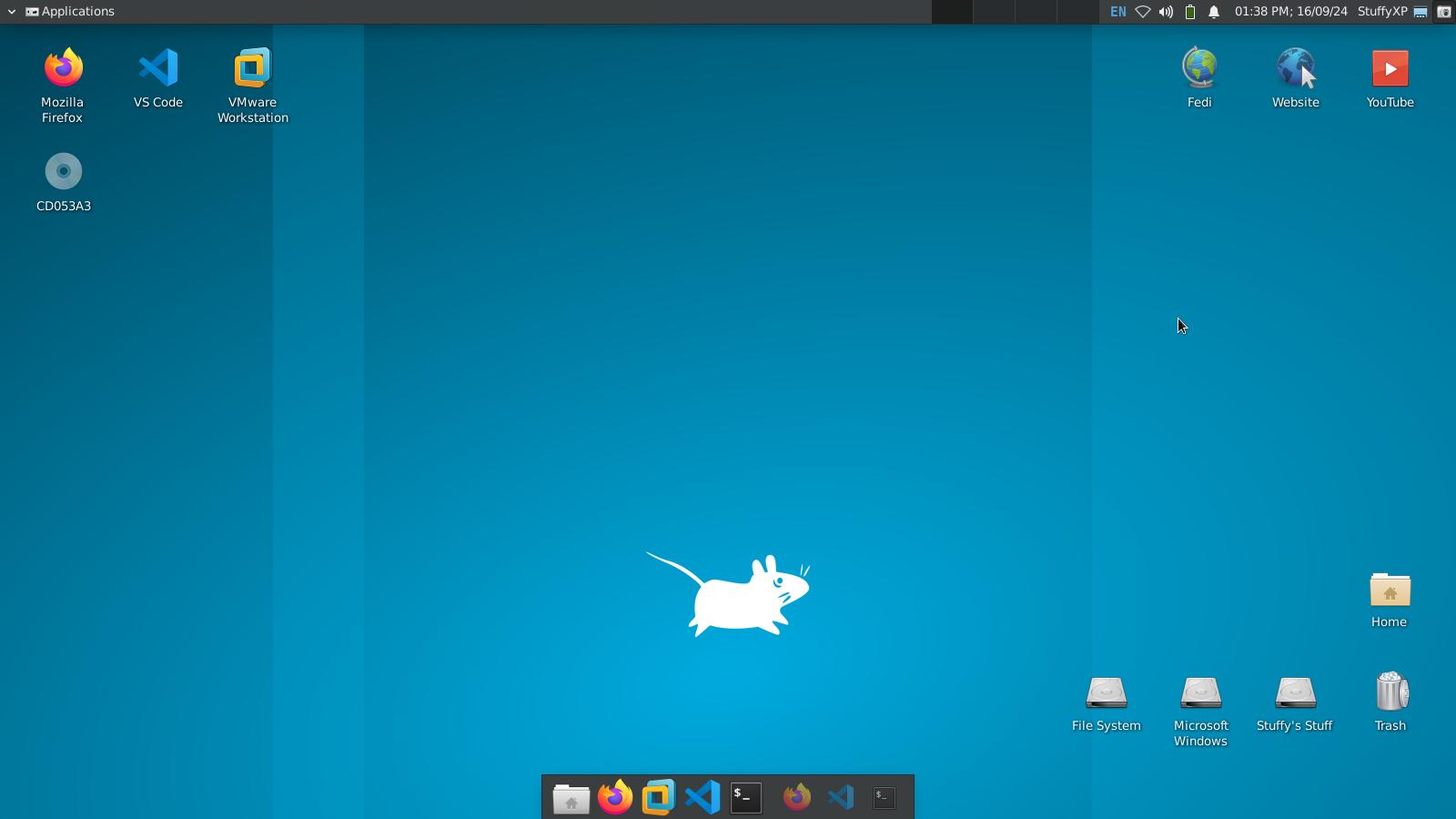
Then i went on to customize the panels a bit, making the bottom one (where the launchers are located) to make a sort of a “macOS Dock”, and the top one where for everything else, workspaces, time &amp; date, user thingy, apps menu, window menu, etc.</p>

<p>Then i grabbed some apps, i got Firefox 130 and VS Code from Snap (ik everybody hates that but that’s the only way to get those apps okay?), grabbed Ruby-Lang from APT, installed Jekyll &amp; Bundler, and installed VMware 12 from <a href="https://softwareupdate.vmware.com/cds/vmw-desktop/ws/12.0.0/2985596/linux/core">here</a> and installed it, it worked, suprisingly!</p>

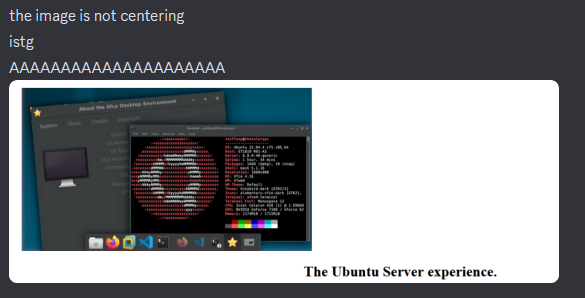
<p>And well, everything is done, here’s the end result!</p>

<p><img src="/blog/img/2024-09-16/result.jpg" alt="" style="max-width: 100%; height: auto;" /></p>

<h2 id="conclusion">Conclusion</h2>

<p>Well after this rollercoaster of shenanigans, everything worked out, and i learned alot about Linux itself, that’s a win-win situation for me!
Now with a working development enviroment, expect more of this soon, new experiences, new shenanigans, new blog posts!</p>

<p>Oh, and also welcome to the new website! Have a great day!</p>]]></content><author><name></name></author><category term="blog" /><summary type="html"><![CDATA[Well i have gotten again into what is the Linux world, and oh well it was kind of a hassle, today i’ll be telling you my experience with the GNOME-less/GUI-less Ubuntu, known as Ubuntu Server. The Prologue You may ask why did i even did this, well basically after running out of space on my Xubuntu install (for the 2nd time), i decided to try something different, as uh, the Xubuntu Minimal install is particularly broken, i couldn’t even manage my own account! My Linux distro of choice is Ubuntu Server, 22.04 Jammy Jellyfish (i can’t run 24.04 my system is not compatible okay), as Canonical said on their downloads website, and i quote: “It will not install a graphical user interface.”, interesting, huh, i thought to myself, as we’re Debian all of a sudden again! - jokes aside i was kinda curious about this, as i won’t have to deal with GNOME anymore, and just install my favorite Linux DE: XFCE! I used Unetbootin to add the Linux image to the Windows Boot Manager, booted it up and worked like a charm, i even managed to not clean my disk by accident since GParted was not present! :D All of that aside, something went wrong, no it didn’t error out when installing, it just didn’t recognize my network “”””"”card””””””, basically it was a network USB, a “Belkin Wireless G USB Network Adapter F5D7050” to be exact, it did detect my Ethernet cards (yes, cards, idk why does the eMachines ET1810 have two Ethernet cards), i didn’t really think about it and just did the installation as usual, and no, this does not look like the Debian installer , it looks more nice and friendly in my opinion, anyways everything went well and i was network-less, and oh boy i wouldn’t know how of much a problem that would be… The problems Everybody encounters issues when trying new things, i’m no exception! (as always haha). As said earlier, networking was one of those problems, i tried everything to make it work, searched up a tutorial on YT, and it actually worked, i was just kind of an idiot when doing so, it worked like a charm tho, if not this website wouldn’t exist, anyway here’s some highlights of the shenanigans i went through. Ubuntu CLI and Wi-Fi First of all, i installed some packages from the official Ubuntu packages website, and unlike Microsoft, they actually had packages for older, unsupported releases! I went ahead and downloaded the WPA supplicant and some other dependencies, installed it and… no change, then i saw that you need to edit some .yml file located in “/etc/defualt/netplan”, i opened it with GNU nano, and just added my device, configured it, added the SSID and password and used DHCP4, and it didn’t work… :/ It turned out that i edited the wrong file, i did it all again, and when i restarted it didn’t save for some reason, did it again and again for like 5 minutes, then in like the 16th time, i saw the verbose startup and …boom.. I saw “197.168.0.24” as the IP address and finally, i had been connected, i don’t know what i did but Ubuntu finally decided to accept the settings! i pinged www.google.com (as every PC user would do, i think) and i recieved 64 bytes as a reply! With networking out of the way, i had another problem… The XFCE/Xorg/X11 shenanigans The network configuration was done. Perfect. Now what? Well i certainly not gonna use a command-line-interface for Linux the entire time so i went ahead and with my newly configured network, to install an X11 server! I used apt install (some command here i don't remember what installed x11 lmao) to get up and running X11, execpt it didnt really work… then i decided to get xubuntu-desktop and it didnt work either, it opened but crashed on startup. I saw a tutorial on how to get XFCE 4.16, ran the ansible-playbook (since it required it), but before that i got some files from that person’s website (the tutorial said so so don’t worry), i opened but required my SSH password… yeah i didn’t know how to get that… I tried with my own user’s password, it didn’t work, i tried the root passowrd, it didn’t work either, at this point i didn’t know what else i could try so i just gave up, and no i didn’t delete the partition dw. Then, after a restart (since i wanted to do show something funny on Windows, the pic below is what i wanted to show), then i rebooted back into Ubuntu and… i got what i wanted… almost. Windows 7 Disk Management window letting me assign a letter, shrink and mount the Linux volume, which does not happen with other distros I had around (this did not happen with Xubuntu), prob happened since I first used that volume as FAT32 then used it in the installer so I wouldn’t get confused lmao For some reason it installed GNOME instead of XFCE, i had a GUI, yay i guess, then everything went straightfoward, i opened the terminal, ran sudo apt install xfce4 and done, XFCE was installed, i just needed to make it the defualt session. It took me a while on how to login into XFCE but then i just did and done! XFCE 4.16 was installed and worked like a charm! Then i went on to customize the panels a bit, making the bottom one (where the launchers are located) to make a sort of a “macOS Dock”, and the top one where for everything else, workspaces, time &amp; date, user thingy, apps menu, window menu, etc. Then i grabbed some apps, i got Firefox 130 and VS Code from Snap (ik everybody hates that but that’s the only way to get those apps okay?), grabbed Ruby-Lang from APT, installed Jekyll &amp; Bundler, and installed VMware 12 from here and installed it, it worked, suprisingly! And well, everything is done, here’s the end result! Conclusion Well after this rollercoaster of shenanigans, everything worked out, and i learned alot about Linux itself, that’s a win-win situation for me! Now with a working development enviroment, expect more of this soon, new experiences, new shenanigans, new blog posts! Oh, and also welcome to the new website! Have a great day!]]></summary><media:thumbnail xmlns:media="http://search.yahoo.com/mrss/" url="https://horibyte.is-a.dev/blog/img/2024-09-16/thumb.jpg" /><media:content medium="image" url="https://horibyte.is-a.dev/blog/img/2024-09-16/thumb.jpg" xmlns:media="http://search.yahoo.com/mrss/" /></entry></feed>